What's new in zn-gate 1.14.0: Antigravity and ZCode desktop app support, Gemini CLI and GitHub Copilot CLI hooks, deeper Codex checks, vault and Team fixes and MCP config scanning
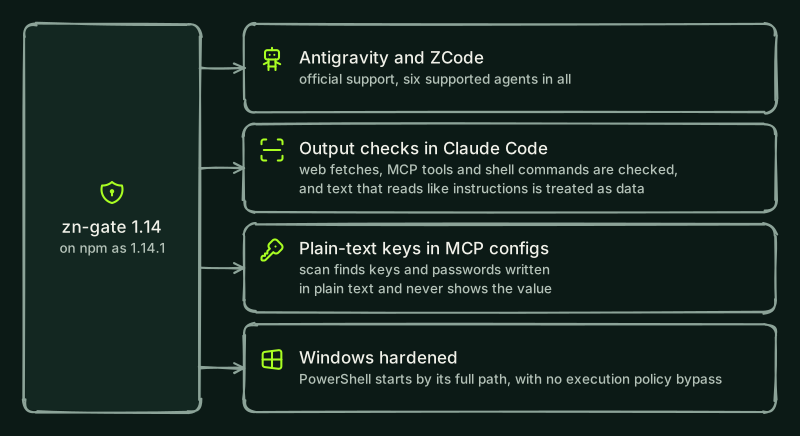
On npm this version is published as 1.14.1, which is 1.14.0 plus fixes for Windows (see the security changelog). zn-gate 1.14.0 adds hooks for Google Antigravity and ZCode desktop app, now supported agents, and experimental hooks for Gemini CLI and GitHub Copilot CLI and more checks for Codex CLI. It also finds keys and passwords written in plain text in MCP server configs, hardens the vault and zn Team, closes a gap in the Python tool guard and adds examples for people who build agents with a framework. zn-gate still needs no account and sends nothing by default. Update with npm install -g zn-gate@1.14.1 and pip install -U zn-gate.
Which new agents does zn-gate protect?
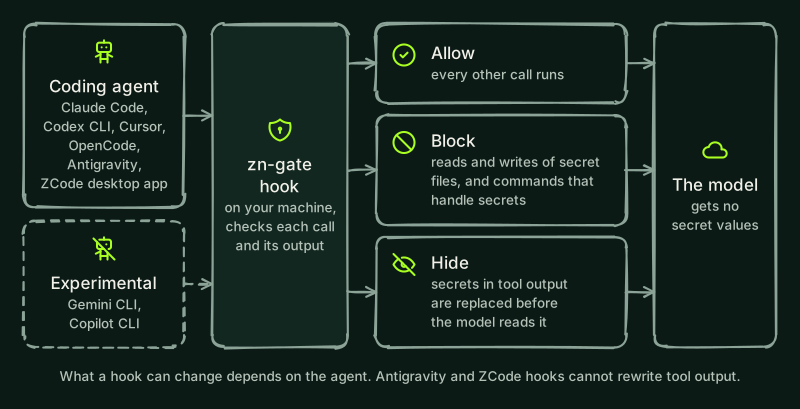
Four more agents get a pre-execution hook. Antigravity and ZCode desktop app join Claude Code, Codex CLI, Cursor and OpenCode as supported agents, which makes six. Gemini CLI and Copilot CLI are experimental and are listed apart.
npx -y zn-gate hooks install gemini
npx -y zn-gate hooks install antigravity
npx -y zn-gate hooks install zcode
npx -y zn-gate hooks install copilot
Add --project to set the hook up for the current project only (not for ZCode, which ignores project hooks). Without it, the hook goes in your user settings.
- Gemini CLI: the hook blocks the agent from reading or writing secret files by path and from running shell commands that handle secrets. It also protects Gemini CLI's own settings files from edits by the agent. Gemini CLI hooks cannot ask for confirmation, so zn-gate blocks what it would refuse, and what it would ask about, with the reason and how to approve it. For everything else Gemini CLI's own approval applies.
- Google Antigravity: the hook does the same and protects its own hook files. A search across a folder asks for confirmation when the folder holds a plain-text
.envor key file. Antigravity hooks cannot rewrite tool output, so matching lines and command output are not redacted there. The Antigravity guide lists what the hook does not cover, including that Antigravity does not document what happens when a hook fails. - ZCode desktop app:
zn hooks install zcode(ornpx -y zn-gate init) adds hooks that run before each tool call and before each prompt. It blocks reads and writes of secret files, shell commands that handle secrets, MCP calls that would send a secret, and a prompt that contains a secret, and the agent cannot edit ZCode's own config file. It cannot remove secrets from what a tool returns (zn adds a notice when an output holds one), ZCode ignores the hooks of a project, and zn's launcher blocks the call when its Node.js is gone, so treat it as a first layer. ZCode's documentation does not say what happens when a hook fails; in our tests with the ZCode desktop app 3.16.3 on Linux, a hook that failed (an exit code other than 2, a crash or a timeout) let the call run, and only exit code 2 or a deny answer blocked it. Tested end to end on the official ZCode desktop app 3.16.3 on Linux x64 (October 2026). The same checks passed on Windows x64 (Windows Server 2022, same app version, October 2026), for an administrator and for a standard user, through the agent the app ships; the Windows app window itself was not driven. macOS was not tested. On Windows,zn-gate checknow recognises the hook thatzn hooks install zcodewrites. A ZCode plugin build for Linux exists; its install steps will be published with its plugin repository. Details: ZCode page. - GitHub Copilot CLI: the hook blocks the agent from reading or writing secret files by path and from running shell commands that handle secrets, replaces secret values in the results of read and shell tools, and protects Copilot's own hook and settings files from edits by the agent. Copilot CLI hooks cannot block a typed prompt, and Copilot lets a call through when a hook times out, so zn, which sets a 15-second timeout on its hooks, blocks the call itself at 11 seconds.
zn-gate check reports these hooks, and warns when Gemini CLI, Copilot CLI or ZCode has hooks switched off. See Install for each agent.
What is new for Codex CLI?
Run zn-gate hooks install codex again after updating, then review the changed hooks in Codex with /hooks.
- zn-gate now checks MCP tool calls before they run, as it already did for Cursor.
- It answers Codex's permission request with a deny when its check would deny the call, so no Approve button is shown for a call zn-gate blocks. It never answers Allow.
- It reviews the model's final answer. It warns you when the answer contains a secret value or a
__ZN_placeholder it did not see earlier in the session. The warning is shown to you, not to the model. To have Codex ask the model to rewrite such an answer, set"stopReview": "block"underhooksin~/.zn/config.json. - An optional setting,
hooks.replaceToolOutputOnSecret, replaces a tool result that holds a real secret with a short text that names the kind of secret, never the value. It is off by default. zn-gate checkreports Codex as not fully protected when another tool'sPreToolUseorPermissionRequesthook is present, because Codex runs those hooks at the same time and such a hook can change a command after zn-gate has checked it. It also reports a zn hook set to run in the background or switched off inconfig.toml.zn-gate hooks install codexalso addsSessionStartandSubagentStarthooks. They add a short reminder for the model and never block. The Codex guide has the setup.
What does scan find now?
zn-gate scan and zn audit look for keys and passwords written in plain text in MCP server configs (.mcp.json, .cursor/mcp.json, .vscode/mcp.json, .codex/config.toml, claude_desktop_config.json and similar). They check a value under a name such as an API key, token or password, an Authorization header, the value after a credential flag in args and a key in a server URL. References such as ${NAME} are not reported. The report shows the kind, the name that holds the value, the file and the line, never the value, and says how to move it into the vault or an environment variable.
npx -y zn-gate scan --include-home--include-home also checks your own MCP configs (Claude Desktop, Claude Code, Cursor, Codex, Gemini, Antigravity, OpenCode and Amazon Q). Scan now lists the folders it does not read, with the reason, instead of skipping them silently, says "No files were scanned" when it finds nothing to scan so an empty result no longer looks clean, follows a link you give as the folder to scan, and reads .vscode/mcp.json. See the scan guide.
Are there security fixes?
Yes.
- Hooks fail closed: hooks for Claude Code, Codex, Cursor and Gemini CLI no longer let tool calls run unchecked when the Node.js they were installed with disappears (an
nvmswitch, an uninstall, an upgrade) or when the hook crashes. They block the call instead. In Claude Code and Codex they also block when the hook times out. Runzn hooks install <agent>again to switch an existing install over;zn-gate checknow reports a hook whose Node.js or launcher is gone. For the Claude Code plugin, runclaude plugin update zn-gate@useznand start a new session; it needs Claude Code 2.1.295 or later. Codex has no setting for this, so its hooks answer with a deny themselves a few seconds before Codex's time limit. - Python tool guard: tool arguments or results nested more than about eight levels deep were passed through without being checked, so a value hidden that deep skipped every rule. They are now blocked with the reason "nested too deeply to check". It affects the Python package, version 1.13.1 and earlier. Update with
pip install -U zn-gate. - Scan output:
zn-gate scanshows control characters in file and folder names as escapes (for example\x1b), so a name in a repository cannot write terminal sequences. This covers both packages. - Hooks: malformed file names and text (such as unpaired surrogates) are refused instead of stopping the hook on some Windows systems. The rule that protects zn's key module also recognises its name when it is built inside a command.
- Experimental gateway: encrypted audit records are tied to their own id and namespace, the audit log refuses to open with the wrong passphrase, the default origin check accepts only loopback origins, and an uploaded policy is verified before it is saved.
- Audit reports:
zn audithides the value after more credential flags, such as--passphrase,--bearerand--jwt. - ZCode install:
zn hooks install zcodeanduninstallare atomic. The install saves whathooks.enabledwas before it touches the config and writesconfig.jsonlast, so an install that fails part-way no longer leaves your own hooks switched on with nothing recorded to undo it. The launcher has its own deadline two seconds under ZCode's hook timeout, so a hook that hangs while starting is blocked instead of letting the call run. - Project hooks: a project install (
zn hooks install <agent> --project) for Claude Code, Codex CLI, Cursor, Gemini CLI and Copilot CLI used to write a barezn hook <agent>command. Whereznor Node.js could not start, for example on another machine, the command failed and the agent ran the call unchecked. The project hook now runs inside a start guard that blocks the call whenznor Node.js is missing or the hook fails (or only warns, on events that cannot block). The guard trustsznand Node.js only from absolutePATHentries, works with everysh, including the one on macOS, and has a PowerShell form on Windows.zn-gate checkreports a barezn hook <agent>in a project file as not protected, and a guard that differs from the one zn writes as modified. Runzn hooks install <agent> --projectagain in that project to replace it. - Hook launchers: the launcher scripts never run a program found in a relative
PATHentry such as., so a program placed in a project folder is never run, and they remove their private files after every call. On Windows,zn.cmdcan no longer start anode.exeornode.batfrom the current folder. If you tried a 1.14.0 release candidate, runzn hooks installagain (andzn hooks install --projectin each project with a project hook) so the hooks it wrote get these fixes. - Plugin hooks: the zn-gate plugin hooks for Claude Code, Codex and ZCode start Node.js only from absolute
PATHentries outside the project or the usual install folders, and the ZCode plugin starts its hooks with/bin/shby its full path, so anodeorshin the project (itsbin/ornode_modules/.bin) never runs in their place. The Cursor plugin is no longer offered: usezn hooks install cursor, and if you added the plugin in Cursor, remove it there (Customize). The plugin no longer adds MCP servers: for thesecretsserver, usezn hooks install claude-code.zn-gate checkreports a plugin hook that does not start this way as not protected. In Claude Code on Windows the plugin needs Git Bash; without it, usezn hooks install claude-code. Update the plugin withclaude plugin update zn-gate@usezn, and install the ZCode plugin again in ZCode (Settings, Plugins). - Plugin folders: the hooks now protect the agents' plugin folders and plugin state as they protect hook settings: an agent can no longer write, delete or move the files of an installed plugin or the list of installed plugins in Claude Code, Codex, Cursor, ZCode and Antigravity, so a prompt-injected agent cannot change a plugin's hook script to skip zn's checks. A project's own
.gemini/and.claude/plugins/folders stay writable. - Hook output: a hook that could not write its whole answer to the agent (for example because the agent closed the pipe) used to exit as if it had worked, so a block could be lost. A failed write now fails the hook, and the launchers accept a hook only when it confirms it wrote its whole answer; otherwise they block the action, or warn for events that cannot be blocked.
- Hook time limits: a hook whose input never ends, or whose check never finishes, now blocks the call before the agent's own time limit, instead of leaving the agent with no answer, which lets the call run. Gemini CLI and Copilot CLI, which let a call through when a hook times out (zn sets their hook timeout to 15 seconds), get the block at 11 seconds. A
SIGTERM,SIGHUPorSIGINTduring a check also answers with the block. - Agents that cannot ask: Codex CLI, Cursor, OpenCode and Gemini CLI cannot show a question, and zn used to drop the ones it wanted to ask (an instruction-file write, personal data in an MCP call, a search over a folder with a plain-text
.env), so the call ran. zn now blocks such a call and the reason says what was held back and how to approve it. Claude Code, Copilot CLI, Antigravity and ZCode keep asking. A tool call that cannot be read is now blocked in every agent. - Invisible marks: the rules now ignore the left-to-right, right-to-left and Arabic letter marks, the Mongolian vowel separator and the Hangul filler characters when they match text, so these characters can no longer split a trigger phrase. The check for tool output that is mostly invisible characters counts them too. Normal Arabic and Hebrew text is not blocked.
- Oversized tool output: an oversized tool event no longer reaches the model unchecked in Claude Code, Codex or Copilot CLI. The hook now withholds the output of a post-tool event that is too large to check, and the plugin launcher stops reading an event at 32 MiB.
zn-gate init: it no longer writes keys or tokens read from the environment (ZN_API_KEY,ZN_JWT_SECRET,ZN_MCP_WS_TOKEN,ZN_DB_KEY) intozn.json, and creates the file readable by its owner only on Linux and macOS.- Experimental gateway audit: every audit entry carries the namespace of the authenticated caller, so a tenant can no longer see the calls of another tenant whose namespace matched. The audit log stores only metadata by default, and the neural layer no longer keeps the arguments of calls. Upgrading the gateway cleans the text that earlier versions left in the vector memory files and clears old neighbour text from the audit log, compacting the database so the text does not stay in free pages. The event stream, the SIEM export and webhook alerts never carry the request payload, and a
data/ref.keythat is a link or is open to other users is refused at start. - MCP calls and network requests: Claude Code now checks MCP tool calls before they run, as the other agents already did: a secret value or placeholder in the arguments is blocked and personal data asks you to approve the call (run
zn hooks install claude-codeagain to update an existing install). Before an agent runs a network request (curl,wget,Invoke-WebRequest, inlinepython -cornode -e, WebFetch, or an MCP call with a URL or headers), the hooks check its headers, query string and body for personal data and literal secrets and ask you before it runs. Requests tolocalhostare skipped, andhooks.egressCheckandhooks.egressAllowHostsin~/.zn/config.jsonchange this. - Instructions in tool output: in Claude Code, the output of web fetches, MCP tools and shell commands is checked with the local rules. When they flag text that reads like instructions, the agent is told to treat it as data and to tell you. This is on by default and never blocks;
hooks.checkToolOutputInstructions: falseturns it off. New rules also flag text in a page, an MCP result or a file that tells the agent to identify its user, or to put the user's name, email or API key in a header, URL, cookie or form field. They are an advisory by default and block in strict mode. - Command rules: the destructive-command and protected-file rules now read a command the way a shell does. Words split by a backslash, brace lists (
c{u,}rl ... | sh), quoted,printfand here-string Base64 payloads, a redirect glued to the word before it, NTFS alternate data streams (.aws\credentials::$DATA) and a home path after@in an upload argument are caught like their plain forms. zn's own folder also stays protected when the home folder name has an accent written in a different Unicode form, as on macOS. The Node.js and Python packages give the same verdicts. - Destructive commands: the agent hooks now refuse by default a recursive delete of the home folder, the filesystem root or a system folder, and a write to a disk device. The agent is told to ask you to confirm first. Four more rules (a download piped to a shell,
chmod -Rorchown -Ron the root or a system folder, a fork bomb and a download written into a shell startup file) are off by default;hooks.blockDestructiveCommandsin~/.zn/config.jsonturns them on. This reads command text only and is not a sandbox. - MCP shield: it now checks tool results in full up to 32 MB (before, only the start and the end of a larger result were checked), and also the notifications and requests that servers send, resource and prompt contents, and every string in tool schemas. A tool schema too deep or too large to check is replaced by a notice instead of passing unchecked. A tool output that is mostly invisible characters no longer lets a secret through in Claude Code, Copilot and OpenCode. In the SDK, a tool result over 4 MB is now blocked by default;
ZN_ALLOW_TRUNCATED=1allows it. - Secret redaction: secrets split across several lines, used as property names in a tool output, in OpenPGP private keys, nested in LangChain results or in more connection URL forms are now redacted, in both the npm and Python packages. A test now redacts random texts of fake keys with both packages and fails if either leaves a key in the output.
- More Python guard checks: it now reads the strings inside dataclasses, pydantic models and other objects, blocks arguments it cannot read in full (a generator, for example, because checking it would use it up), decodes Base64 without
=padding and checks and masks the message of an error raised by a tool, because agent frameworks send that message to the model. The LangChain integration supportslangchain-core1.3.3 and later; earlier releases have a known high severity advisory. - Audit, vault and gateway: the encryption of the audit log draws each nonce from a random generator seeded by the operating system, and existing encrypted records are upgraded the first time the audit vault opens with its key. A vault error no longer quotes decrypted text.
zn auditno longer shows the value after a credential flag as the package name of an npx MCP server.zn-gate init --revertrestores only the newest backup next to the config and skips backups that are links or sit in another folder, so a repository can no longer redirect a restore onto your own MCP config. The experimental gateway updates rustls-webpki, webpki-root-certs and wasmtime (RUSTSEC-2026-0378, -0379, -0382 and -0383).
- Instruction files: the agent hooks ask before an agent writes to the files where it keeps memory and standing instructions (
MEMORY.md,AGENTS.md,CLAUDE.md,.cursorrulesand similar), because agents read them in later sessions. In strict mode the write is refused, andhooks.agentInstructionWrites: "off"turns the question off. Reading these files is never blocked. Agents that cannot ask (Codex CLI, Gemini CLI, OpenCode and Cursor's file tools) keep their own approval rules.
- More command spellings: a download piped into a shell or into
Invoke-Expressionis now also caught when it is written with ANSI-C quoting ($'...') or with PowerShell backtick escapes inside a word. Text that is only printed, as inecho $'curl ... | sh', is still allowed.
What changed for the vault and zn Team?
- Secret markers in arguments (breaking):
zn runand the agent hooks no longer fill in a secret marker written in a command's arguments, because arguments show in the process list and in command-line logs. Store the secret for the program (zn secret set PGPASSWORD --command psql), then runzn run --secrets PGPASSWORD -- psql "postgres://user@db/app", wherepsqlreads the variable itself. A marker in an environment file that your shell loads (a shadowed.env) is still filled in.secrets_http_requestnow sends only secrets stored inproxymode: change a secret's mode withzn secret allow NAME --mode proxyif an API needs it. - Approvals follow the value: a first-use approval now belongs to the value it was given for. Removing a secret deletes its approvals, and replacing a value asks again. Approvals saved by 1.13.x and earlier carry no id and do not count, so after you update, each secret asks once more the first time a command uses it.
- Short values: the vault no longer accepts a new secret under 8 characters, because such a value cannot be told apart from ordinary text. A short value stored by an older version keeps working.
- Who can ask for a value: masking now runs inside the vault daemon, and every request for a value names a destination or a purpose that the daemon checks against what it holds. A request with no context is refused and written to the audit log. A program that can talk to the daemon can still ask for a stored secret by name in a context that fits it: the threat model says what this does and does not stop.
- Windows and unsafe scripts: the vault sets explicit owner-only permissions on its folders, the session key and the daemon pipe, and does not start if it cannot verify them.
zn runrefuses to give secret values to a script that others can write or that sits in a folder they can write. - Reset and purge:
zn vault resetkeeps an encrypted backup and says where it is. The newzn vault purgedeletes a vault for good: it lists every file, asks you to confirm (never for an AI agent) and checks that none is left.zn-gate uninstallnow removes backups and token maps too. - Audit log check: the unlocked vault now checks the whole audit log (every record's signature, the chain and the last record it remembers) before
zn vault logshows it,zn vault log export --otlpexports it orzn team syncuploads it, and before it adds to it. Until now only the last record was compared. The vault also compares the log with the last record it remembers, by sequence number and signature, before it unlocks and before every write, and audit records are flushed to disk when written. If a check fails, the log is not shown, exported or uploaded, the vault stores a warning that survives lock and unlock, andzn vault verifyfails until you accept the log withzn vault verify --acknowledgein your own terminal. Limits: with the vault locked,zn vault logandzn vault log export --otlpcannot check the chain and say so; restoring an oldersecrets.age, with or without its olderaudit.jsonl, is not detected; and if the vault process is killed, records written since its last save (up to a minute) can be cut without notice. When the vault unlocks after an unclean shutdown and takes over audit records that were not yet checkpointed, it writes awarnrecord, so every crash shows inzn vault log. - zn Team policy:
zn team syncrefuses a second signed policy that has the same version but different content, and a sync that started before you left a team can no longer apply its answer. When a new policy version loosens a restriction,zn team statuslists what changed, the audit log records it and Claude Code says so once. - zn Team join and leave:
zn team joinno longer uploads the audit records written before you joined;--include-historyadds them, at the first join only.zn team joinandzn team syncexit with code 1 when the policy was not applied, andzn team leavetells the server first and says what it answered.zn team joinalso stops, with nothing sent, when the local audit log cannot be read. - Team detectors: the organization's custom detectors are no longer lost when
~/.zn/team.jsonor the policy copy is deleted or edited:zn team syncandzn team statusput them back from the vault.
What else is new?
- The Node.js package has the same tool guard as the Python one:
checkToolCallandguardTool. It also ships TypeScript types. zn vault resetis the way out when you forget the vault passphrase. It runs only in your own terminal, asks you to type a confirmation phrase and saves the old vault in a backup folder first.zn team managed-configprints the managed settings an administrator deploys with device management so the hooks run on every developer machine. It writes nothing.- When a hook blocks something or hides a secret,
zn-gate evidencenow shows it as an event (never a value, command, path or prompt text). - Runnable examples for CrewAI, LlamaIndex, the OpenAI Agents SDK, Pydantic AI, Google ADK and Haystack. Each one checks a tool's output before the model reads it, runs locally with made-up pages and needs no API key. See Frameworks.
- A command line reference lists every
zn-gatecommand, and an upgrading guide says what to do after each update. - Each release now includes a software bill of materials for the npm and Python packages.
zn-gate scanno longer exits 0 when its result does not cover every file it should have read. It exits 3 when no file was read, or when a file or folder was skipped (2 MiB or larger, cannot be read, not a regular file). Findings still exit 1, and--allow-partialkeeps exit 0 when only some files were skipped. CI jobs that runzn-gate scanmay see this new exit code.- Hooks start faster on Node.js 22.1 and later, and the Python package now lists Python 3.14. The hooks also load the code that runs other programs only when they need it, and checking a very large tool output for hidden characters is faster when it has none.
- The scrubber catches more ways of pasting a secret: values in backticks, escaped JSON from logs,
setx NAME value, PowerShell assignments andNAME=value command. zn-gate uninstallremoves zn-gate in one step. It lists what it found (the Claude Code plugin, zn's hooks for each agent and MCP servers wrapped byinit --wrap-mcp), asks you to confirm in your own terminal, removes them and runszn-gate check. The vault is deleted only if you confirm that separately, and--dry-runshows the list without changing anything. Agents cannot run it for you: like the other commands that change your setup, it needs you to run it in your own terminal. See Remove zn-gate.- Hooks for the pre-commit framework:
zn-gate-scanrunszn-gate scanandzn-auditrunszn auditon your repository before each commit. They need Node.js 18 or later. zn auditnow reads instruction files that agents load through another file (@pathimports inCLAUDE.mdand theinstructionspaths ofopencode.json), finds agent files whose names differ only in letter case, reports an agent file it cannot read and says "not checked" instead of "No findings" when it found nothing to read for an agent. It also has fewer false positives: scoped Claude Code permissions such asBash(git status:*), ordinary setup steps such as copying.env.exampleto.env, and documentation inside aSKILL.mdare no longer reported as risks.zn-gate checkandzn-gate statusrecognise managed installs (Claude Code's managed settings, Cursor's enterprise hooks and Codex'srequirements.toml) and name the file. They also warn, without blocking, when your Node.js is end-of-life (18 and 20) or older than the patched release of its line. The Claude Code plugin now needs Node.js 20.19 or later; zn-gate and zn's hooks still run on Node.js 18 and later.- In Python,
guarded_toolnow scans a tool's output for prompt injection by default (passcheck_result=Falseto keep the old behaviour), names blocked targetstool:<name>and also works on async tools. New native hooks cover Google ADK, the OpenAI Agents SDK and Pydantic AI, including tools these frameworks supply themselves, such as MCP servers. The package ships type information (py.typed). - More runnable examples: AG2, DSPy, LangChain.js, Mastra, OpenAI Agents SDK (JavaScript), Vercel AI SDK, smolagents and Semantic Kernel.
- Vault, keychain and connect errors now say what happened and one next step in plain words. The technical detail shows only with
ZN_VERBOSE=1orDEBUG=zn;DEBUG=*no longer turns it on.zn unlockandzn vault statusshow when the vault locks in your local time, andzn-gate -vprints the version in the Python package. zn's local MCP servers support protocol versions up to 2025-11-25 and their tool descriptions say when to call them. The npm package is smaller: about 1.0 MB to download instead of 1.6 MB.
zn auditreports an instruction file with a run of 40 or more empty lines followed by more text (new rule ZNA021, medium), because that text is out of view for a reviewer. The local rules also read a long run of empty lines as one, so text after padding is checked together with the text before it.zn auditno longer flags text that only discussescurl | shas a risk, or a placeholder such as<system-or-project>in the notes of a skill.
What else is fixed?
- A prompt blocked for a secret now names the credential when the text shows its name, for example
DB_PASSWORD. The value is never shown. zn env shadowmoves a whole connection URL to the vault when its password is short.- OpenCode on Windows with PowerShell as its shell wraps a command with a
__ZN_NAME__marker correctly. - The evidence log no longer loses a record when several programs write at once, including on Windows.
--helpworks onzn unlock,zn lock,zn vaultandzn team. Forzn hooks,zn secretandzn env, ask a subcommand:zn hooks install --help,zn secret set --helpandzn env shadow --help.- A slow or stuck MCP server no longer delays your other servers, and a dead WebSocket server is reconnected.
- A command with several Base64 pipes (
echo ... | base64 -d) is now checked pipe by pipe. Before, only the first one was decoded, so a harmless first pipe could hide a blocked command in a later one. More than 16 pipes, or more than 128 KiB of decoded data, is blocked. - The Antigravity hook now answers with the steps to repair it when Node.js is missing or the hook cannot start: install zn-gate and run
zn hooks install antigravityagain. Before, Antigravity got no usable answer. - The MCP shield checks the keys of structured server content like its values, so an instruction placed in a key no longer reaches the agent.
- Antigravity: the hook now blocks writes to a
.envfile that holds plain-text secrets, as the docs say, and asks before a recursive shell search (grep -r,rg) over a folder that holds one. On Windows it now starts: the hook command no longer relies on quotes, which Antigravity does not use, so a Node.js path with spaces no longer breaks it. Runzn hooks install antigravityagain to replace an existing hook. - Experimental gateway: an action that was already denied is no longer approved, an approval can be used only once and a ban lasts until it expires. Pending approvals expire after 15 minutes by default, and a WebSocket message over 1 MiB closes the connection by default. With AWS KMS it keeps the same data key across restarts, and it refuses to start, unless you allow a fallback, when the KMS key cannot be fetched. Its scrubber now matches the Node.js one on JSON members,
Authorizationheaders and card numbers that follow a rejected candidate. zn-gate scannow readstest,testsand__tests__folders in both packages, because fixtures there can hold real secrets, and both skip the same folders. The Python scan lists a folder it cannot read, as the Node.js one does, and paths stay clean when the folder you scan is reached through a link.
A release every week
Starting with 1.14, zn-gate ships on a weekly train: one larger release every week instead of many small ones. A release candidate goes out a few days before each release (npm next tag and a PyPI pre-release), so you can try it early. We only ship outside the train for a high or critical security fix or a broken install.
On our horizon
- Ask before an agent edits its own memory and instruction files (CLAUDE.md, AGENTS.md, skills).
- Catch instructions hidden in HTML comments inside skills and documents.
- ZCode tested end to end on macOS, and Antigravity on Windows and macOS.
- The same command rules in the Rust engine as in the Node and Python packages.
Frequently asked questions
What is new in zn-gate 1.14.0?
Hooks for Google Antigravity and ZCode desktop app, now supported agents, and experimental hooks for Gemini CLI and GitHub Copilot CLI. More checks for Codex CLI (MCP tool calls, permission requests, the final answer). zn-gate scan and zn audit find keys and passwords written in plain text in MCP server configs. Vault and zn Team fixes: a secret marker in a command's arguments is no longer filled in, approvals follow the value they were given for, and zn Team policy sync is stricter. A fix for the Python tool guard, which skipped values nested more than about eight levels deep. A tool guard and TypeScript types for the Node.js package, zn vault reset, zn team managed-config and examples for CrewAI, LlamaIndex, the OpenAI Agents SDK, Pydantic AI, Google ADK and Haystack.
How do I update to zn-gate 1.14.0?
On npm this version is published as 1.14.1: run npm install -g zn-gate@1.14.1 for the Node package and pip install -U zn-gate for the Python package. Then run npx -y zn-gate@1.14.1 hooks install <agent> for each agent you use again (for example hooks install codex) so the new hooks are added; npx -y zn-gate@1.14.1 check tells you which agents need it. If you use the Claude Code plugin, run claude plugin update zn-gate@usezn and start a new session; it needs Claude Code 2.1.295 or later.
Are Antigravity and ZCode desktop app supported, and are the Gemini CLI and Copilot CLI hooks finished?
Antigravity and ZCode desktop app are supported agents, which makes six with Claude Code, Codex CLI, Cursor and OpenCode. Their hooks block reads and writes of secret files by path and shell commands that handle secrets, but they cannot rewrite tool output, so matching lines and command output are not redacted there. A secret pasted into the prompt is not blocked in Antigravity; ZCode blocks it. ZCode ignores the hooks of a project, so it has no project install. Tested end to end on the official ZCode desktop app 3.16.3 on Linux x64 (October 2026). The same checks passed on Windows x64 (Windows Server 2022, same app version, October 2026), for an administrator and for a standard user, through the agent the app ships; the Windows app window itself was not driven. macOS was not tested. The Gemini CLI and Copilot CLI hooks are experimental: Gemini CLI hooks cannot ask for confirmation, Copilot CLI hooks cannot block a typed prompt, and Copilot lets a call through when a hook times out, so zn, which sets a 15-second timeout on its hooks, blocks the call itself at 11 seconds. zn-gate check reports whether each hook is in place.
Do I need to change anything for the vault and zn Team?
Yes, in two cases. If a command you run through zn run or the agent hooks has a secret marker such as __ZN_DB_PASSWORD__ in its arguments, it is now refused, because arguments show in the process list and in command-line logs: store the secret for the program (zn secret set PGPASSWORD --command psql) and run zn run --secrets PGPASSWORD -- psql instead. And approvals saved by 1.13.x and earlier no longer count, so zn asks once more, the first time a command uses each secret after you update. Nothing else needs a change.
Does the Python tool guard fix affect me?
It affects the Python package, version 1.13.1 and earlier, if you use the tool guard (guard, guarded_tool or check_tool_call) on arguments or results that can be nested deeply. Values nested more than about eight levels deep were passed through without being checked. From 1.14.0 they are blocked with the reason "nested too deeply to check". Update with pip install -U zn-gate.
Do I need an account to use zn-gate 1.14.0?
No. zn-gate still needs no account and sends nothing by default. The optional cloud check stays off until you run zn-gate connect.
The full list of changes is in the 1.14.0 release notes. zn-gate is MIT, runs locally and needs no account: start with npx -y zn-gate scan --include-home, or see Install for each agent.