What's new in zn-gate 1.16.0: a clearer check, zn why, secrets in agent history, a package audit, stricter command checks
John Silver11 min read
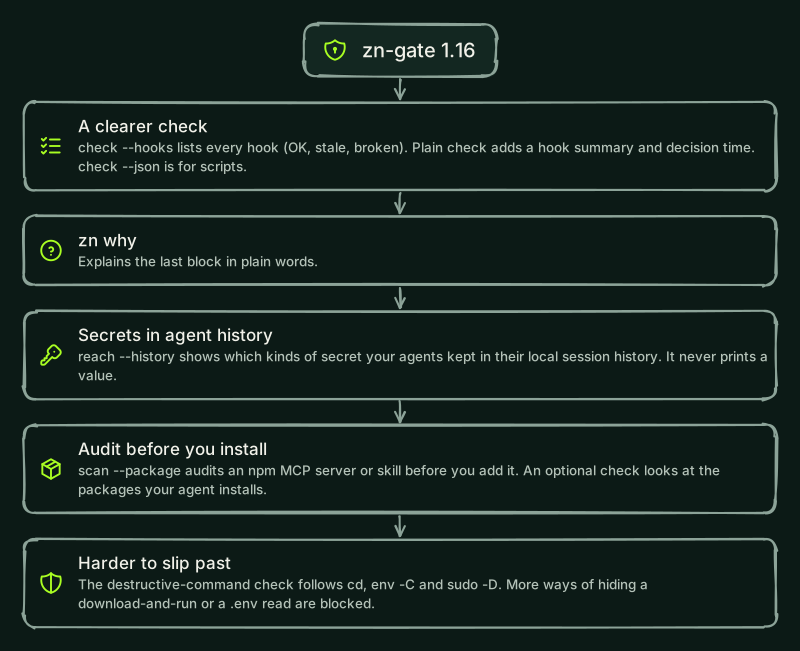
zn-gate 1.16.0 makes the check easier to read and easier to script. zn-gate check --hooks lists every installed hook and says whether it is OK, stale or broken, plain check ends with a one-line hook summary and the decision time per tool call, and check --json gives the same result to scripts and CI. zn why explains the last block in plain words. It also adds four features that are off until you ask for them, makes the command checks read more of what a shell really runs, and checks every zn-gate file the hook loads. zn-gate still needs no account and sends nothing by default. Update with npm install -g zn-gate@1.16.0 and pip install -U zn-gate.
Does the check tell me more now?
Yes. Four additions, all local:
zn-gate check --hooks(alsodoctor --hooks) lists every installed zn hook with its agent, its settings file, its event and the command it runs. Each hook is OK, stale (written by an older zn-gate) or broken (it cannot run, is turned off, is written twice, or is in a settings file zn cannot read), and a stale or broken line comes with the command that fixes it. It only reads files: nothing is run, changed or sent.- A hook summary. Plain
checkanddoctorend with one line, for exampleHooks: 3 OK, 1 stale, 0 broken. Run zn-gate check --hooks for details.It shows only when a hook is installed and does not change the exit code.zn-gate statusalso warns when a hook was written by an older zn-gate, names each agent and gives the command that refreshes it. - Decision time.
checkends with the p50 and p95 of the last 100 tool calls, measured on your machine. It leaves out process startup, writing the response, and saving stats and evidence. It is stored in~/.zn/stats.jsonas numbers only and readsno data yetuntil zn has checked a tool call. zn-gate check --json(alsodoctor --json) prints one JSON object for scripts, CI and support requests: the protection state and the reason for each agent, the versions and the exit code. The exit codes are the same as in the text form, and your home folder shows as~.
What does zn why do?
zn why explains the last block in your decision log, or the record with the id you give it (zn why <id>), in plain words: what was stopped (only the short preview the log already holds), which rule fired, why it matters, and the command you can run in your own terminal to go on, when there is one. It only reads the log and never uses the network. It is in the npm package.
Six block messages now follow the same pattern: they name the rule, say why it matters and say who may allow it, with the one command to run when you can. They cover a destructive command, a .env file and other secret files, a request that would send personal data, a command too long to check, and a vault that is not available. The messages start with the same words as before. When a wildcard such as ls * or cat * is stopped because it would also match a .env file, the message now says that about the pattern and tells you to name the files you need.
What is new, and off unless I ask for it?
- Secrets in agent history:
zn-gate reach --history. It reads the Claude Code and Codex history files in your home folder, line by line, and prints the agent, the file, the type of secret, how many times it appears and what to do (rotate the key, delete the session). It never prints a value.--jsongives the same for scripts. It writes nothing, sends nothing and follows no link, and when its time limit (--max-seconds, 120 by default) is reached it says which files it did not finish. It cannot see what was already sent to your model provider. The Python package has it too, with the same report, flags and exit codes. - Audit a package before you add it:
zn-gate scan --package <name>[@version]. zn-gate downloads an npm MCP server or skill from the registry, checks it against its checksum, unpacks it into a temporary folder and reads its files with a scanned extension, together with the agent-config audit. No folder is skipped by name, sonode_modules,distandbuildinside the package are scanned too. Before the result, the report lists what npm would run if you installed it: itspreinstall,installandpostinstallscripts with their command, and itsbincommands. Nothing in the package is installed or run. The exit code is1on findings,3when part of the package could not be read, and2when the package cannot be fetched or is refused (for example the checksum does not match). It does not scan the packages the package depends on. - A check on the packages your agent installs. It covers
npm install,pnpm add,yarn add,bun add,pip install,uv addandpipx install, and it never blocks a command. Sethooks.packageInstallCheckto"offline"in~/.zn/config.json(orZN_PACKAGE_CHECK=offline) and your agent asks before it installs a name that looks like a well-known package (one letter off, two letters swapped, a look-alike character, other separators, or an npm scope that imitates a well-known one). With"online"(config file only), zn-gate also asks the public npm or PyPI registry, for a plain install, whether the name exists, sending only the package name, and asks when it does not exist or was first published less than 14 days ago. Agents that cannot show a question (Codex CLI, OpenCode, Gemini CLI) run the command, and every finding goes to the decision log. Notices for a version published less than 72 hours ago, and for annpm installin a project that may update the lockfile, are a separate opt-in (hooks.packageInstallNotices). - Limit the hosts a command reaches:
zn run --egress-allow HOST[:PORT],.... zn sets a local proxy on 127.0.0.1 for the command, and requests to other hosts get a 403. It covers programs that read the proxy variables (curl, gh, requests, axios) and, in Node, only versions that honourNODE_USE_ENV_PROXY. Thefetchof an older Node, programs that ignore the variables, raw sockets and DNS are not covered.
Which commands does the check read now?
The destructive-command check blocks a recursive delete of your home folder, the filesystem root or a system folder. 1.16.0 reads more of what a shell really runs before it decides:
- Folder changes. It follows
cdandpushdearlier on the line, andenv -C,env --chdir,sudo -Dandsudo --chdir.cd ~ && rm -rf .,env -C ~ rm -rf .andsudo -D / rm -rf .are blocked likerm -rf ~, and a nested shell starts in the folder the line has reached. The same commands on a project folder (cd build && rm -rf .,env -C ~/projects/app rm -rf .) stay allowed, and so doescd ~ && rm -rf .cache. - Shell keywords and backticks.
{ rm -rf ~; },if true; then rm -rf ~; fi,while ...; do ...; done,! rm -rf ~and a command inside backticks are read like the same command on its own. - Download and run. The check now also blocks a shell that reads its program from a substitution on its input (
bash < <(curl URL),sh <<< "$(curl URL)"), a downloader or shell written another way (/bin/sh -c "$(curl ...)",bash <(\curl ...)), a download piped into a group or onto the next line (curl URL | (sh)), and literal variables assigned earlier on the same line (X=curl; $X URL | sh).bash < <(echo hi),diff <(curl ...) <(curl ...)andcurl URL | jq .stay allowed. .envspellings. A.envfile named with a path prefix (./.env,app/.env,/srv/app/.env), in a PowerShell list (cat .env.example,.env), with a PowerShell parameter (Get-Content -Path:.env) or spelled through cmd.exe (type .e^nv,%NAME%units) or through a shell expansion that could complete the name is blocked. Example files such as.env.examplestay allowed, and.env.dist,.env.defaultsand.env.schemaare blocked.- The launcher checks every file. At install, the hook launcher records the SHA-256 of the code and data under
lib/, ofpackage.jsonand ofbin/cli.js. Each of those files is checked when the hook loads it, and a file that was edited, is missing from the list, is a link or lies outside the package stops the hook.zn-gate checknames a changed file. The launcher script itself, the Node.js binary, files read as data and the inline PowerShell hooks on Windows (Codex CLI, Cursor, Gemini CLI, Antigravity) are not covered.
See Destructive commands for the full list.
What changed for teams, zn audit and Python?
- Teams.
zn team status --rulesprints the rules of your organization's active signed policy in plain words: the version, the key id, when it expires, and each rule with what it blocks, warns about or restricts, and the reason. It makes no network call and shows no rules from a copy that does not verify or has expired.zn team join -reads the join token from standard input, so it stays out of your shell history and the process list (printf %s "$TOKEN" | zn team join -, or setZN_TEAM_JOIN_TOKEN). A token given as an argument still works. zn audit.zn audit --approverecords the executable configuration of a project (MCP servers, hooks, permissions, helper commands, install scripts and more). Later audits report a changed, added or removed entry as ZNA023, by name only. The approval is yours: the command runs only at a terminal, and zn blocksaudit --approvewhen an agent writes it. A new rule, ZNA022, flags a hook of typehttpthat posts tool events to an address.- Claude Code.
zn hooks install claude-codealso registers theConfigChangeandInstructionsLoadedhooks. Run it again to add them. - GitHub Copilot is no longer marked experimental.
zn hooks install copilotsets up the hooks that VS Code, the GitHub Copilot app and Copilot CLI share. The hooks were run end to end with Copilot CLI only, and the VS Code part is documented, not tested in the app. - Python. A local check starts in less than half the time it took, because
import zn_gateno longer compiles every rule up front. The Python package also redacts the same secret shapes as the Node.js package, andpython -m zn_gateruns thezn-gatecommand.
Is anything breaking?
Not for most people. These are the changes that can stop something that worked before:
- Unknown options are errors.
check,doctor,status,version,test,evidence,logs,export,team status,scanandanalyzeexit with2on an option they do not know, and the message lists the options the command takes. Before, the option was ignored. - Misspelt settings in
zn.json. A setting in thesecurityorauditsection that zn does not know is now an error that names the setting and the closest valid one. In other sections it is still a warning. - Stale hooks. If
checksays a hook is stale, or that a launcher records only the runner, runzn hooks install <agent>again. - An unknown hook event (a name or a shape this version does not know) is now blocked on the hooks that can block, in Claude Code, Codex CLI, ZCode and Cursor, with a message that says to update. Run
zn hooks install <agent>to get the new launcher. - If you set
ZN_HOME. Until now, the decision log, the hook settings inconfig.jsonand the secret request list stayed in~/.znwhenZN_HOMEwas set, while stats, pins, the vault and the cloud key followed it. All of zn's state now followsZN_HOME. With the variable unset, nothing changes.
How do I update?
npm install -g zn-gate@1.16.0
pip install -U zn-gate
npx -y zn-gate@1.16.0 check
The update refreshes the hook launchers it wrote. If your package manager skips install scripts (npm install --ignore-scripts, pnpm or bun), or you updated with sudo, run zn hooks install <agent> again for each agent you use. check tells you which agents need it. If you use the Claude Code plugin, run claude plugin update zn-gate@usezn and start a new session.
If you already set ZN_HOME, move evidence.jsonl and requests.jsonl from ~/.zn into that folder, and copy the hooks part of config.json there too. Those three used to stay in ~/.zn, and zn now looks for them in the ZN_HOME folder.
The full list is in the changelog.