What's new in zn-gate 1.17.0: GnuPG keys protected, stricter command checks, a stricter Team policy
John Silver7 min read
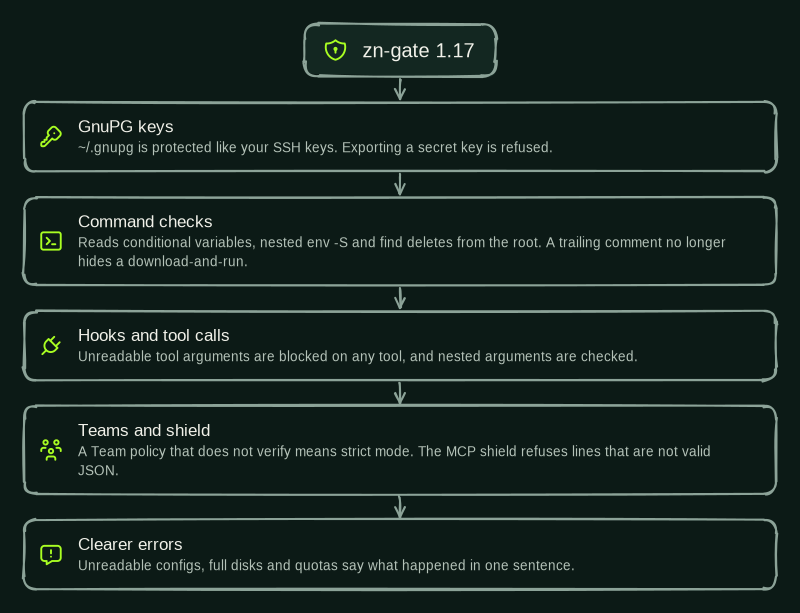
Most of zn-gate 1.17.0 is about the places where a careful check used to say yes because it could not see enough. Your GnuPG keys now sit behind the same guard as your SSH keys. The command check reads the variables, the nested wrappers and the comments that a shell would act on. A Team policy that no longer verifies stops being ignored. And when something goes wrong on your disk, the message says what, in one sentence. zn-gate still needs no account and sends nothing by default. Update with npm install -g zn-gate@1.17.0 and pip install -U zn-gate.
What happens if my agent goes looking for my GnuPG keys?
Until now, ~/.ssh/id_* and ~/.aws/credentials were off limits and ~/.gnupg was not. In 1.17.0 the files in ~/.gnupg (%APPDATA%\gnupg on Windows) are refused when a tool tries to read them, and so is the folder: a command that names it, such as tar, cp -r, grep -r, zip -r, rsync, cd or ls, is stopped.
Your own work does not get in the way. gpg, gpg2, gpgconf, gpgsm and gpgv may still name their keyring folder when every option of the call is a read-only one written in full, so gpg --list-keys and gpg --homedir ~/.gnupg --list-keys keep working. Exporting a secret key is refused for every gpg program and keyring, and exporting a public key stays allowed. gpg-connect-agent is refused when zn cannot see the commands it would read, because it can start another program.
What does the command check read now?
The destructive-command check still stops a recursive delete of your home folder, the filesystem root or a system folder. 1.17.0 closes four ways a line could hide one:
- A variable that might still hold the old value. In
D=/usr; [ -n "$X" ] && D=./build; rm -rf "$D", the folder may still be/usrwhen the delete runs. zn now treats a variable set after&&or||, inside anif,caseor loop, in a group or in a function as holding every value it may have, and the worst one decides. An assignment that always runs still replaces the old value, soD=/usr; D=./build; rm -rf "$D"stays allowed. - A wrapper inside a wrapper.
env -S "-S rm -rf /home/alice"andenv -S "rm" -rf /home/alicewere allowed and are blocked now. A line that nests more than three levels ofenv -Sis refused instead of guessed at. - A
findthat deletes. From the filesystem root, a delete is refused even with a filter such as-name.-execdir,-okand-okdirwithrmcount as a delete, and afindthat deletes over paths read from-files0-fromis refused anywhere, because the paths are not in the command. Afindinside your project, or from the root without a delete, stays allowed. - A comment at the end of a line.
curl URL | sh # noteis still caught as a download piped into a shell.
A shell command that names more than 64 files it could write, or that runs the instruction-file check out of time, now asks instead of passing silently, and is refused in strict mode. See Destructive commands for the full list, and Keep secrets out of your coding agent for the credential files.
What changed for tool calls, teams and the MCP shield?
When the GitHub Copilot or ZCode hook receives a tool call whose arguments it cannot read, such as text that is not valid JSON, a number or a list, it blocks the call on every tool, not only on the tools zn knows. For a tool zn does not know, the hooks now look for commands and file paths in nested arguments, up to six levels deep, and apply the same shell, secret-file and destructive-command checks as at the top level. Copilot and VS Code tasks are checked in every platform override and in a custom shell, so a command cannot hide in the shell settings.
The hook launchers run the hook only while the installed zn-gate files match what they recorded. The commands that record those files again (installing, updating, rebuilding or linking zn-gate, and the launcher refresh) are now refused to the agent, like zn hooks install, and ask you to run them in your own terminal. The plugin build also refuses more ways of reaching the Node.js module loader. Both close specific paths an agent could use to get a changed zn-gate file trusted; they are not a complete guard on the package files.
In zn Team, a stored policy that does not verify, for example an edited copy or a changed organization key, used to be ignored, blocks included. Now the machine goes to strict mode: every secret is blocked and nothing the organization had opened stays open, until zn team sync brings a valid policy. zn team status says so.
The MCP shield no longer forwards a line from the agent that is not valid JSON (one with NaN, for example) to the server unchecked. The agent gets a parse error when its request id can be read, and shadow mode passes the line on and reports it.
Will I understand the errors better?
That was the other half of the release. When a settings file or an MCP config cannot be read as JSON, zn now says why in one sentence: the file has comments, starts with a byte order mark, or is not valid JSON at a given line. It says the file was left unchanged and what to do. zn-gate init --wrap-mcp also accepts a config that starts with a byte order mark, for example one saved by Notepad, and keeps the mark.
A full disk quota is reported by name on Linux, the vault says why a secret could not be written, and zn unlock --passphrase-stdin with nothing on standard input says that no passphrase was read. A last evidence record that was cut off by a crash or a full disk is reported as incomplete, never as harmless and never as tampering, because zn cannot tell the two apart.
The Python package catches up with the Node.js package. It gets scan --code and --all, takes only full long option names, masks e-mail addresses, phone numbers, IBAN, card numbers and Spanish and US identity numbers in zn-gate test with the same checks, and writes the same evidence record for the same event.
Is anything breaking?
Not for most people:
- Python options. A shortened long option such as
scan --allowis now an error with exit2, instead of being read as--allow-partial. - Config changes.
zn-gate init --wrap-mcpand--revertexit with1when a config cannot be changed, for example on a full disk, instead of0. - Approved projects. After
zn audit --approve, a project shows OpenCode plugin files and Amazon Q agent and rule files as added the first time, until you approve it again. - Updating from the agent. Your coding agent can no longer install, update, rebuild or link zn-gate. Run those commands in your own terminal.
- The Claude Code plugin. The plugin does not update by itself. The upgrade guide and the plugin README now say how to move it to a new release (remove the usezn marketplace, add it again, install the plugin), and
zn-gate checkandzn-gate initsay so when the installed plugin is older than zn-gate.
How do I update?
npm install -g zn-gate@1.17.0
pip install -U zn-gate
npx -y zn-gate@1.17.0 check
If you use the Claude Code plugin, run this in your own terminal and start a new session:
claude plugin marketplace remove usezn
claude plugin marketplace add usezn/zn
claude plugin install zn-gate@usezn
zn-gate check tells you when the plugin is older than your zn-gate. If your package manager skips install scripts (npm install --ignore-scripts, pnpm or bun), or you updated with sudo, run zn hooks install <agent> again for each agent you use.
The full list is in the changelog.