What leaves your machine
Nothing, by default. Exactly what zn-gate evaluates locally, what it can send, and the settings that control it.
Nothing, by default. Everything zn-gate does runs on your machine. The cloud is optional, off until you turn it on, and only ever receives prompt text from which the secrets zn-gate detects were removed locally first. Personal data in that text is not removed.
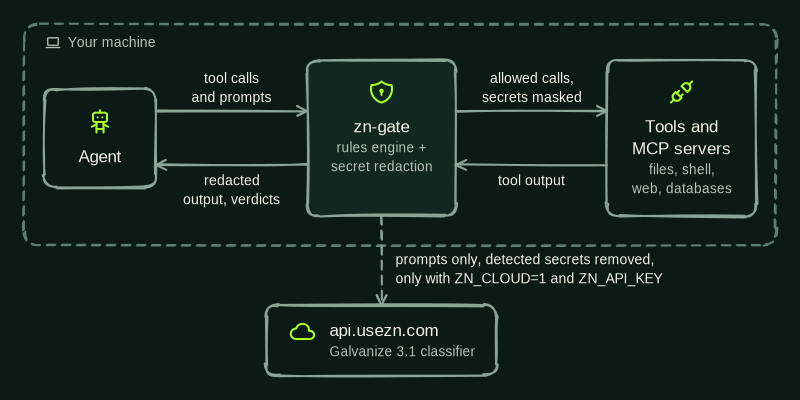
Per type of data
| Data | Evaluated | Sent anywhere? |
|---|---|---|
Tool output (check_tool_result, shield) |
Locally | Never, with one opt-in exception in Claude Code: a capped sample of web, MCP and shell results, only after zn-gate connect and {"hooks": {"cloudCheckToolOutput": true}} in your own ~/.zn/config.json (see the opt-in cloud check of tool output) |
Tool-call arguments (check_tool_call, shield) |
Locally | Never, in any configuration |
MCP tool and parameter descriptions (shield) |
Locally | Never, in any configuration |
Prompts (analyze_prompt, zn-gate analyze, Python analyze()) |
Locally | Only if you set both ZN_CLOUD=1 and ZN_API_KEY, run zn-gate connect yourself (Node package), or use the API key option of the Claude Code plugin (for analyze_prompt only). The secrets zn-gate detects are removed locally before sending; personal data is not. |
Local audit log (~/.zn/evidence.jsonl) |
Written locally | Never |
Counts of what zn-gate did (zn-gate stats: checks, blocks, secrets replaced, per secret type) |
Written locally to ~/.zn/stats.json |
Never, unless you turn on zn-gate stats share on: then, each time you run zn-gate stats, one report per complete day (at most the last 3 days) with a random installation id, the day, the zn-gate, OS and Node.js versions, the agent and part of zn-gate used most, and the number of secrets found per built-in type (never values, prompts, variable or secret names, paths, hosts or emails). zn-gate stats share show shows it first. |
Team audit trail (~/.zn/audit.jsonl) |
Written locally | Only on a machine joined to a Team organization with zn team join: metadata (secret name, agent, tool, host, decision) is uploaded to your organization. Never secret values, prompts, file contents or tool output. See zn Team. |
| Secret values in the vault (Scrubber, npm) | Encrypted locally | Never to zn. zn fills a value only into a program you allowed (zn run) or a request to a host you allowed (secrets_http_request, headers only by default). What an allowed program does with it is up to that program, and an unlocked vault answers any program of your OS user (limits) |
Vault audit log (zn vault log) |
Written locally, never values | Never |
In Python, evaluate, guard, check_tool_call, check_tool_result, sanitize_tool_result, redact_secrets and the LangChain, CrewAI, LlamaIndex and Promptfoo integrations are always local. The only function that can reach the network is analyze(), under the same two conditions.
The settings that control it
ZN_API_KEYalone enables nothing.ZN_CLOUD=1together withZN_API_KEYlets prompt analysis also ask the cloud model for a second opinion.ZN_LOCAL_ONLY=true(or--local-only) forces local-only, even withZN_CLOUD=1.zn-gate connectsaves an analysis-only API key in your system keychain (or the zn vault) and turns on the same optional cloud check foranalyze_promptandzn-gate analyze. Nothing changes until you run it.zn-gate disconnectremoves the key and can revoke it (details).
Check your own configuration at any time:
npx -y zn-gate statusThe MCP tool zn_status returns the same information to your agent. All settings: Configuration.
When the cloud is on
With ZN_CLOUD=1 and a key, a prompt is first checked by the local rules. If they block it, nothing is sent. Otherwise the text, with secrets replaced by placeholders such as [REDACTED_AWS_KEY], is sent to api.usezn.com for a second opinion from the Galvanize 3.1 model. If the cloud cannot be reached, zn-gate returns the local result. Retention and processing of what the cloud receives: privacy policy.
The opt-in cloud check of tool output
In Claude Code, zn-gate can also ask the cloud check about tool output. It is off by default, also after zn-gate connect. It turns on only if you ran zn-gate connect and also added {"hooks": {"cloudCheckToolOutput": true}} to your own ~/.zn/config.json. Environment variables and project settings cannot turn it on. Remove the setting, or set it to false, to turn it off.
When it is on, a sample of each web fetch, MCP tool or shell command result, at most 16 KiB (the first 12 KiB and the last 4 KiB), goes to api.usezn.com with the saved key. Secrets zn-gate detects, and email addresses, phone numbers, IBANs, card numbers and national ID numbers, are replaced first. IP addresses, names, postal addresses, usernames and secrets it does not recognize are sent as written. A result the local check already flagged is not sent, and Read results are never sent. The check never blocks or changes the output; it only adds a note.
Other connections and what they send
| Connection | When | What it sends or does |
|---|---|---|
zn-gate scan --package NAME |
Only when you run it yourself | Downloads that package from the npm registry (registry.npmjs.org, or the address in ZN_NPM_REGISTRY) to scan it. Nothing from your machine is uploaded |
zn-gate init |
Only when you run it yourself, and only for the steps you confirm | If you say yes to installing zn-gate for your user, it runs npm install -g zn-gate, which downloads the package from the npm registry |
Earlier versions
zn-gate 1.4.0 and earlier (npm): with ZN_API_KEY set, tool output and tool-call arguments not blocked locally were sent to api.usezn.com without redaction. 1.4.1 removes that path. If you used 1.4.0 with ZN_API_KEY, upgrade and consider rotating any credential that could have appeared in tool output. Details in the CHANGELOG.
Python 1.4.0 and earlier: only analyze() and zn-gate analyze sent text, when ZN_API_KEY was set, without redaction.